
Law Office / Compliance calendar (New Jersey)
Attorney Compliance Calendar (New Jersey)
One calendar year of a New Jersey lawyer's dated duties on one page, each with the rule or courts page it comes from.
Registration, CLE, pro bono and the trust account, in one place. For New Jersey lawyers and the people who keep their calendars. Type your year, your date of birth and the year you were admitted. The sheet works out your registration fee and your CLE period, then lists every dated duty for the year for you to mark done.
Works in Excel 2016 or later, Google Sheets and LibreOffice. No macros.
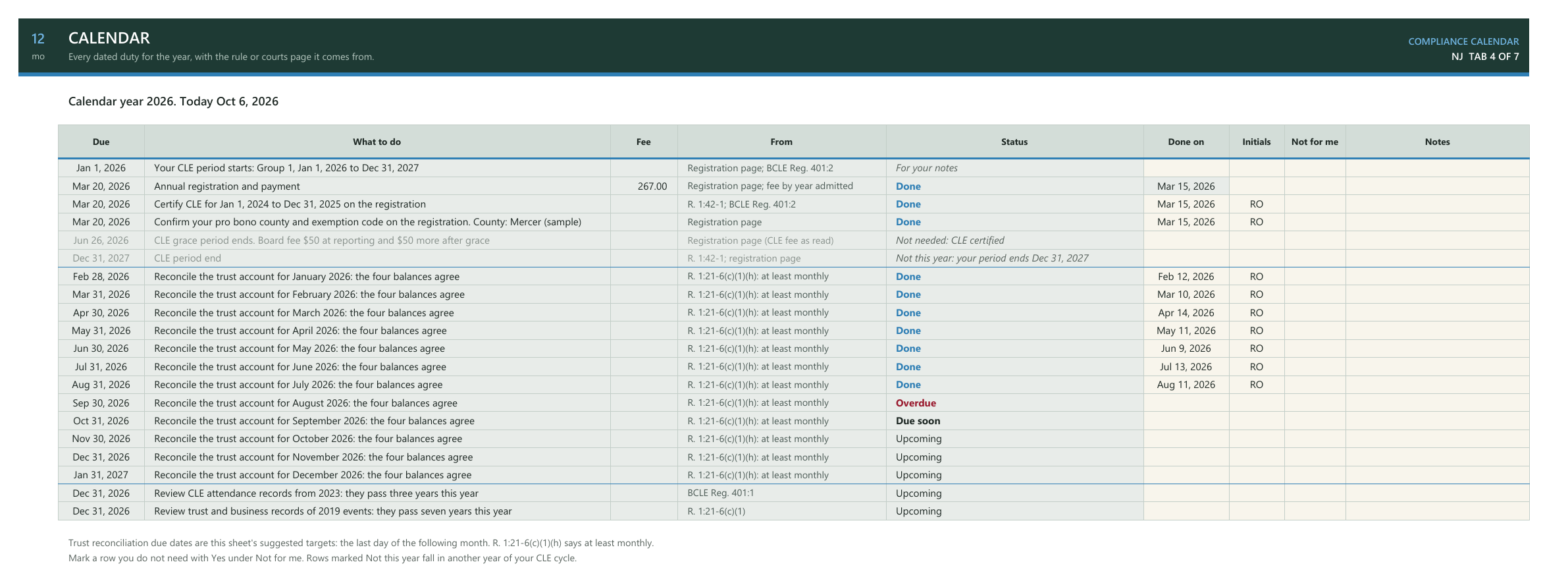
Scroll the sheet sideways to see all of it.
How the year is laid out
First you. Your year, your date of birth, the year you were admitted and your status. The fee goes by the year you were admitted, from a Fee Table pre-filled with the 2026 figures as read. Your birthday sets your CLE group and your two-year period.
Then the dates. Registration and payment, CLE certification and the grace date, pro bono, twelve trust reconciliations and the records reviews, each with the rule or courts page it comes from. R. 1:21-6(c)(1)(h) says at least monthly and gives no day, so each reconciliation's target, the last day of the next month, is labelled as the sheet's suggestion.
Then what is left. Type the date you did each one. The Dashboard lists what is past due and what falls in the next 30 days, and shows the year month by month.
The sample year, 2026as of Oct 6, 2026
- Jan1 of 1 done
- Feb1 of 1 done
- Mar4 of 4 done
- Apr1 of 1 done
- May1 of 1 done
- Jun1 of 1 done
- Jul1 of 1 done
- Aug1 of 1 done
- Sep0 of 2 done
- Oct0 of 1 done
- Nov0 of 2 done
- Dec0 of 4 done
All doneStill openA past month still open
- Your CLE periodGroup 1, Jan 1, 2026 to Dec 31, 2027
- You certify this period in2028
- Pay on or beforeMar 20, 2026
- CLE grace period endsJun 26, 2026
- Your fee this year267.00, paid on time
A made-up lawyer, admitted 2010, with seven reconciliations marked done and four dates of the lawyer's own. The name and the dates are made up.
What the sheet works out, and what it leaves to you
| What | What the sheet does | The Check note you might see |
|---|---|---|
| The fee | Looks up your fee on the Fee Table by calendar year and year admitted: on time or after the deadline by the date you paid, or by today if you have not paid. Retired and military status: you still file, and the fee is 0.00. | Check: type the year you were admitted |
| The CLE period | Works out your group from your date of birth and your two-year period, and shows the year you certify it on the registration. | Check: type your date of birth |
| Registration status | Active, Retired or Military, picked from a list. | Check: pick your registration status |
| A new year | Change the year on Profile and every date moves with it. Add that year's deadline and fees to the Fee Table from the courts page. | Check: type the calendar year |
| Trust reconciliations | Twelve rows, one a month, each with a target on the last day of the next month, labelled as the sheet's suggestion. No trust account: mark No and the twelve rows show as not needed. | |
| Records reviews | A row each December for the CLE attendance records that pass three years and the trust and business records that pass seven. | |
| Your own dates | Up to 30 of your own, such as insurance, a lease or bar dues, marked as yours and not from a rule. A line with no date to it gets a Check note. | |
| The Dashboard | Lists what is past due and what falls in the next 30 days from both tabs in date order, and shows the year month by month. |
Every Check note describes what you typed. None of them decides anything.
The rules it quotes
The Rules tab carries 13 passages from the courts' registration page, R. 1:21-6 and the CLE Board's regulations, word for word, with the web address on njcourts.gov and the date each was read. Here they are in plain words.
| What | In plain words | Source |
|---|---|---|
| Annual registration | Every New Jersey lawyer registers online at the start of the calendar year. | Registration page |
| The fee | Set by the calendar year you were admitted. The 2026 amounts are on the Fee Table. | Registration page |
| Retired or military | You still file the registration, even with no payment due. | Registration page |
| CLE groups | Born January to June: Group 1, with periods starting Jan 1 of even years. July to December: Group 2, odd years. Each period runs two years. | Registration page |
| CLE grace period | The 2026 grace date is June 26, with a further fee for hours not finished by then. | Registration page |
| Pro bono | If you qualify for an exemption, its code goes on the registration form. The codes are not listed in the sheet. | Registration page |
| CLE records | Keep a record of CLE course attendance for at least three years. | BCLE Reg. 401:1 |
| Trust reconciliation | At least monthly, reconcile the journals' cash balance, the checkbook, the bank statement and the client ledger balances. | R. 1:21-6(c)(1)(h) |
| Seven years | Keep the trust and business records for seven years after the event they record. | R. 1:21-6(c)(1) |
The sheet never says you have met a rule: it lists dates and counts what you mark done. Rules and fees change, so check the current text on njcourts.gov before relying on it.
What's in the file
Seven tabs, each under the pine band with 12 over mo in its corner. Rice-paper cells are yours to type in. Grey cells are formulas: leave them alone and they stay right.
- 1 Start HereHow the tabs fit, how to start a new year, and what the sheet never does.
- 2 ProfileYour year, date of birth, year admitted, status and pro bono county. The sheet works out your CLE group and period and this year's fee.
- 3 Fee TableEach year's payment date, CLE grace date and fees by year admitted, pre-filled with 2026 as read.
- 4 CalendarRegistration, CLE, pro bono, twelve trust reconciliations and the records reviews, each with its source. Type the date you did each one.
- 5 My DatesYour own dates, such as insurance, a lease or bar dues, marked as yours and not from a rule.
- 6 RulesThe text each row rests on, word for word, with the source and the date read.
- 7 DashboardWhat is past due, what falls in the next 30 days, and the year at a glance, one square per item.
Yours to type inWorked out by the sheetDone, and the rule under each bandOnly for a Check note or a date gone byThe band on every tab
Every date and fee was checked before it went on sale. LibreOffice recalculated the workbook, and a separate program read it back and compared it with dates and fees worked out by hand: the CLE group and period, the payment date and fee, the twelve reconciliation targets and their status, the records reviews, and the Dashboard's lists and month counts.
Then nine test copies each tried one case: paid after the deadline, admitted in 2025 before and after the deadline, admitted in 1976, a Group 2 birthday, no trust account, retired status, a year with no Fee Table line yet, and your own dates sorted in with the Calendar's. Each gave the figure worked out by hand, or the Check note it should.
Questions
Does it work in Google Sheets?
Yes. Upload the file to Google Drive, then open it. Every formula is a plain one, so it works there too. It also opens in Excel 2016 and later and LibreOffice Calc, with no macros and no add-ons.
Does it tell me I have met the rules?
No. It lists the dates and counts what you mark done. The Rules tab quotes the text so you can read it yourself and decide.
What do I do next year?
Change the year on Profile, add that year's payment date, grace date and fees to the Fee Table from the courts page, and clear the done dates. Every row moves to the new year.
Why is each reconciliation due at the end of the next month?
R. 1:21-6(c)(1)(h) asks for a reconciliation at least monthly and gives no day. The sheet suggests the last day of the next month and says so on the Calendar.
I have no trust account. Does it still work?
Yes. Mark No on Profile and the twelve reconciliation rows show as not needed. Mark any other row Not for me and it drops out of the counts.
Is it only for New Jersey?
Yes. It was built around New Jersey's registration page, R. 1:21-6 and the CLE Board's regulations, which the Rules tab quotes. Other states set their own dates.
Is there a subscription?
No. It's a one-time download, for personal use or use within one firm per purchase. You keep the file.
What if something doesn't work?
Email [email protected] and include your order email. Typical response within 2 business days.
Please note
- Digital download. Nothing is shipped.
- No macros, no add-ons, no subscription.
- An organiser, not legal advice. The sheet never says you have met a rule: it lists dates and counts what you mark done. The Rules tab quotes the text for reference, and every Check note describes what you typed; none of them decides anything.
- Not connected with the State of New Jersey, the New Jersey courts, the Office of Attorney Ethics, the Lawyers' Fund for Client Protection, the Board on Continuing Legal Education or any bar association.
- The pro bono exemption codes, IOLTA and professional-entity duties are not covered.
- The sample lawyer and the dates are made up.
License: personal use, or use within one firm per purchase. No resale or sharing of the file.
One year, one page
A one-time download, for personal use or use within one firm per purchase. Digital file, nothing shipped, no subscription.
Sold through Gumroad. Questions before you buy: [email protected]
Excel 2016 or later, Google Sheets, LibreOffice
More from the Law Office: Contingent Fee Calculator and Closing Statement (New Jersey), Attorney Trust Account Reconciliation Workbook (New Jersey), Law Firm Closed File Retention and Destruction Log (New York), Case Deadline and Discovery Tracker, Billable Hours and Invoice Log, Client Trust Account Ledger (New York), Executor Estate Inventory and Ledger, Medical Records Request and Chronology Log, Settlement Disbursement Sheet (New York), Law Firm Client Intake and Conflict Check Log, Successor Trustee Accounting Ledger, Deposition Tracker and Summary Log, Power of Attorney Agent Ledger and Record Log (New York)